The bibliographical look-up and matching REST API
Architecture
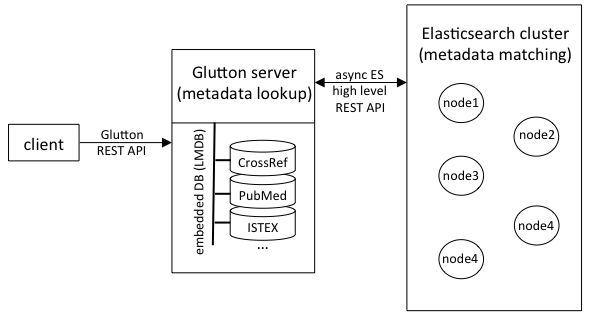
Below is an overview of the biblio-glutton architecture. The biblio-glutton server manages locally high performance LMDB databases for all metadata look-up tasks (several thousand requests per second with multiple threads). For the costly metadata matching tasks, an Elasticsearch cluster is used. For scaling this sort of matching queries, simply add more nodes to this elasticsearch cluster, keepping a single biblio-glutton server instance.
Runtime evaluation
1) Metadata Lookup
One glutton instance: 19,792,280 DOI lookup in 3156 seconds, ~ 6270 queries per second.
2) Bibliographical reference matching
(to be completed with more nodes!)
Processing time for matching 17,015 raw bibliographical reference strings to DOI:
| number of ES cluster nodes | comment | total runtime (second) | runtime per bib. ref. (second) | queries per second |
|---|---|---|---|---|
| 1 | glutton and Elasticsearch node share the same machine | 2625 | 0.154 | 6.5 |
| 1 | glutton and Elasticsearch node on two separate machines | 1990 | 0.117 | 8.5 |
| 2 | glutton and one of the Elasticsearch node sharing the same machine | 1347 | 0.079 | 12.6 |
Machines have the same configuration Intel i7 4-cores, 8 threads, 16GB memory, SSD, on Ubuntu 16.04.
The first step to deploy a biblio-glutton instance is to to create the bibliographical databases and search index, see the page Build-Databases for detailed explanation.
After installing all or a selection of bibliographical databases, the bibliographical REST API can be started.
The following describes how to build and start the bibliographical service.
Build the service
You need Java JDK 1.11 or more installed for building and running the tool.
./gradlew clean build
Start the server
./gradlew server
The service will use the default project configuration located under biblio-glutton/config/glutton.yml. To select a configuration file in another location use the additional parameter -Pconfig=/other/path/glutton.yml as follow:
./gradlew server -Pconfig=/other/path/glutton.yml
To check if it works, you can view a report of the data used by the service at host:port/service/data. For instance:
curl localhost:8080/service/data
{
  "ISTEX size (LMDB)": "{istex_doi2ids=0, istex_istex2ids=0, istex_pii2ids=0}",
  "Crossref metadata stored size": "{crossref_Jsondoc=149817829}",
  "Crossref metadata indexed size (elastic)": "{glutton=149812959}",
  "HAL Metadata stored size (LMDB)": "{hal_Jsondoc=3780904}",
  "PMID size (LMDB)": "{pmid_doi2ids=946688, pmid_pmc2ids=850087, pmid_pmid2ids=1287533}",
  "DOI OA size (LMDB)": "{unpayWall_doiOAUrl=0}"
}
Each item represent a data storage. By default they are LMDB storage and their databases (e.g. for PMID there are three databases pmid_doi2ids which stored the lookup from doi to PMID, etc..) except for Total Metadata indexed size which measure the records indexed in Elasticsearch (the name, like in this case glutton is the configured index name).
Start optional additional GROBID service
biblio-glutton takes advantage of GROBID for parsing raw bibliographical references. This permits faster and more accurate bibliographical record matching. To use GROBID service:
-
First download and install GROBID as indicated in the documentation, normally as a docker image to take advantage of Deep Learning models for more accurate parsing of bibliographical references.
-
Start the service as documented here. You can change the
portused by GROBID when strating the docker container, or by updating the service config file undergrobid/grobid-home/config/grobid.yaml. -
Update if necessary the host and port information of GROBID in the biblio-glutton config file under
biblio-glutton/config/glutton.yml(parametergrobidPath).
While GROBID is not required for running biblio-glutton, in particular if it is used only for bibliographical look-up, it is strongly recommended for performing bibliographical record matching. And vice-vera, configuration the biblio-glutton service for Grobid will provide high quality consolidation services to resolve the bibliographical references automatically extracted by Grobid.
Troubleshooting
Issues with the elasticsearch index
It might happens that logs from Grobid show messages with error 500:
INFO [2024-08-30 12:50:17,897] org.grobid.core.utilities.Consolidation: Consolidation service returns error (500) : Server Error
corresponding to the following error on the biblio-glutton side:
35.175.72.198 - - [30/Aug/2024:12:21:13 +0000] "GET /service/lookup?parseReference=false&atitle=Latent+Dirichlet+Allocation&firstAuthor=Blei HTTP/1.1" 500 0 "-" "Apache-HttpClient/4.5.3 (Java/17.0.11)" 1710
You can double check and verify that the Storage works correctly, by calling the lookup:
curl http://localhost:8080/service/lookup?doi=10.1371/journal.pone.0265361
If the lookup works but calling the direct matching does't (error 500) it's probably a problem with the elasticsearch node.
curl http://localhost:8080/service/lookup?parseReference=false&atitle=Latent+Dirichlet+Allocation&firstAuthor=Blei
NOTE that code 404 or 400 are normal and should not be considered as an error.